
Your weekly regional sales review.
Use a few consistent questions to turn order geography into a useful review of your Shopify store.
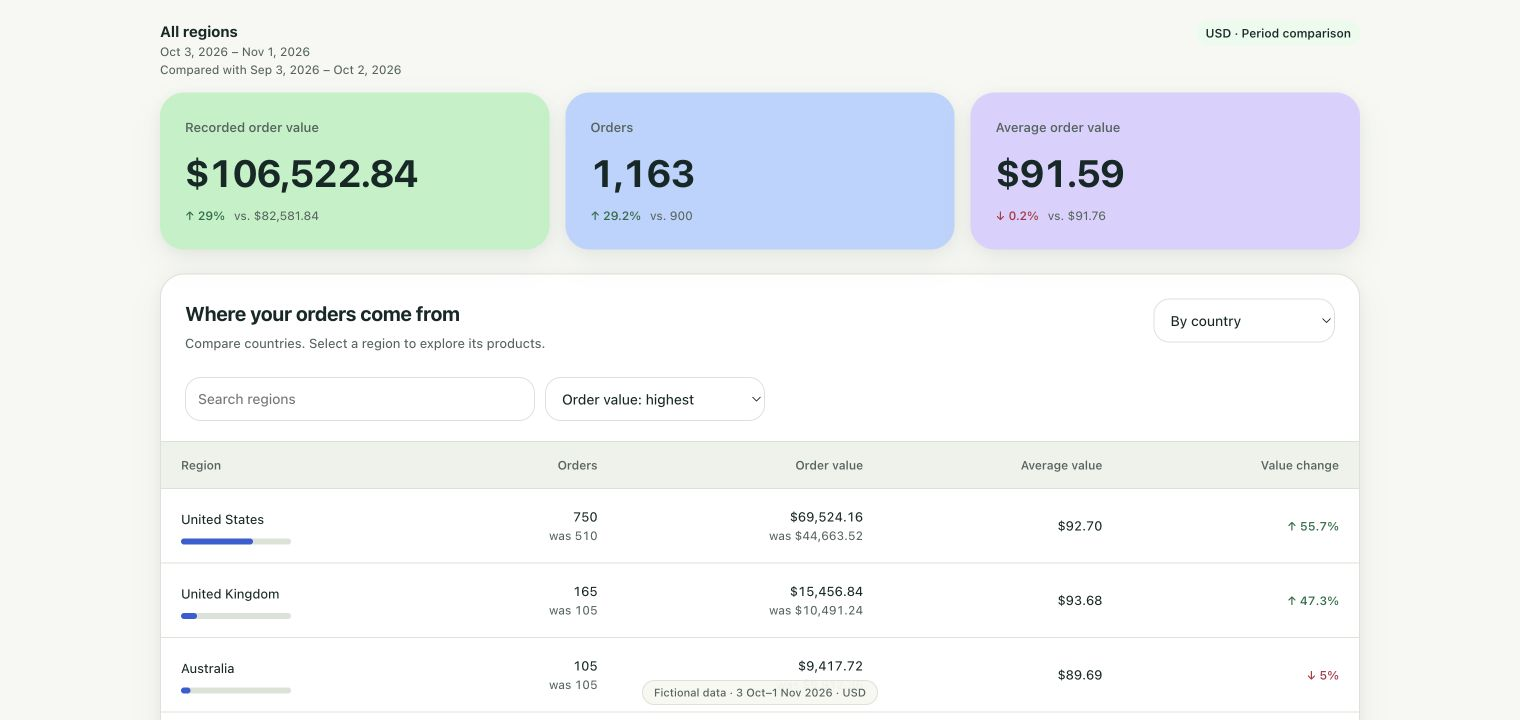
1. Check the history before comparing
Open Reports in Naksalite and select the last seven complete days. Read the coverage notice before interpreting a change. A recent-order cap, unfinished sync or currency exclusion can make a period incomplete. Use a longer 30-day window for a quieter store only when both periods have enough history.
2. Find a region worth investigating
Compare order count and recorded order value by country, then inspect a state or province where supported by your order data. Look at absolute changes as well as percentages: a region moving from one order to two is different from one gaining fifty orders.
3. Inspect what sells there
Open the region's product breakdown. Check whether the change is concentrated in a product, and review the product coverage notice. Current product summaries use the synced line items available to the report; missing items can affect the result.
4. Choose one next question
A regional change may be a reason to review inventory, shipping options or an existing campaign. It does not establish what caused the change. Check your advertising platform or fulfillment data before attributing results or committing spend.
5. Save a view and return
Save the report view on your current device and export a CSV if you need to share the figures. Next week, open the same view for a fresh complete period. Record the action you took separately so you can review the outcome without confusing correlation with causation.
Know what the numbers mean
Naksalite's recorded order value includes recorded tax and shipping and does not subtract refunds. It is not net sales, profit or ROAS. Map views use orders with available locations; Reports shows its own coverage and exclusions. Your plan's latest-order allowance controls the history available for analysis.
Choose a plan with enough history or open Naksalite on the Shopify App Store.